From Offline Error Page to Gaming Legend The Complete Story of Google Chrome's Dinosaur Game
Known internally as Project Bolan, Google's Chrome Dinosaur Game has quietly entertained millions of people around the world every month. Even more impressive, it requires no download, no account, no advertisements, and no purchases. It simply appears whenever you need it—or whenever you choose to play.
Highlights
- Google introduced the Chrome Dinosaur Game in September 2014.
- The project was internally known as Project Bolan.
- It was designed to make losing an internet connection feel less frustrating.
- The game was created by Google UX designers Sebastien Gabriel, Alan Bettes, and Edward Jung.
- The T-Rex symbolises returning to a "prehistoric" world without internet access.
- Early Android compatibility issues required Google to rewrite parts of the game's code before it became widely successful.
How an Offline Error Page Became Internet History
Most browser error pages simply tell users something has gone wrong.
Google wanted to take a different approach.
Instead of showing a lifeless error message, the Chrome team looked for a way to create a small moment of enjoyment during an otherwise annoying experience. Their goal wasn't to build a full-featured game. They simply wanted users to smile while waiting for their internet connection to return.
That simple idea turned into one of Google's most successful hidden features.
Today, countless people intentionally launch the Dinosaur Game even when their internet connection is working perfectly. What began as a creative experiment has become one of the most famous browser-based games ever created.
Its popularity proves that engaging gameplay doesn't always require advanced graphics, complex mechanics, or expensive development budgets.
Sometimes, simplicity wins.
The Prehistoric Origins: Why Google Chose a T-Rex
Behind every memorable product is a thoughtful idea, and the Chrome Dinosaur Game is no exception.
The game was developed in 2014 by Google's UX designers:
- Sebastien Gabriel
- Alan Bettes
- Edward Jung
The team wanted to transform an unavoidable frustration—losing internet access—into something light-hearted and enjoyable.
Rather than reminding users about what they couldn't do, Google gave them something fun they could do while waiting.
The choice of a dinosaur was far from random.
The developers joked that losing internet access felt like travelling back to prehistoric times—an era before Wi-Fi, smartphones, cloud computing, and instant access to information.
In other words, if you're offline, you're living in the age of dinosaurs.
That playful concept became the foundation of the game's identity and remains one of the reasons it feels so memorable today.
The Meaning Behind "Project Bolan"
Many Chrome users know the game simply as the "Dino Game," but inside Google, it carried a completely different name.
The project's official codename was Project Bolan.
This wasn't chosen by accident.
It was a tribute to Marc Bolan, the legendary frontman of the iconic 1970s rock band T. Rex.
The reference cleverly connected the game's dinosaur theme with one of rock music's most recognisable names, adding another layer of personality to a project that most users would never even realise existed.
Small details like this reflect Google's long-standing tradition of hiding playful references and easter eggs inside many of its products.
A Difficult Beginning Before Global Success
Although today's Chrome Dinosaur Game feels polished and effortless, its launch wasn't completely smooth.
When Google released the game in September 2014, developers quickly discovered that it didn't perform well on several older Android devices.
Performance issues affected the overall experience, making it clear that improvements were necessary before the game could reach its full potential.
Rather than abandoning the idea, the development team went back to work.
Later that same year, Google rewrote parts of the game's code to improve compatibility and deliver smoother performance across a wider range of Android devices.
The update proved to be a turning point.
Once those technical issues were resolved, the game rapidly grew in popularity.
Users embraced its simple gameplay, nostalgic pixel-art visuals, and surprisingly addictive challenge.
Within a short time, what had started as a hidden browser feature became one of the world's most-played browser games.
When Students Started Turning Off Their Wi-Fi on Purpose
Perhaps the biggest sign of the Dinosaur Game's success came from an unexpected place—schools.
Students discovered that disconnecting from Wi-Fi instantly unlocked the hidden game.
Instead of focusing on lessons, many intentionally disabled their internet connections just to play as the running T-Rex.
The behaviour became common enough that Google eventually introduced an option allowing school administrators to disable the Dinosaur Game on managed Chrome devices.
It's a remarkable achievement for what was originally intended to be nothing more than a brief distraction during internet outages.
Very few browser easter eggs have ever reached a level of popularity where educational institutions needed tools to limit access.
That unexpected impact perfectly illustrates how a tiny hidden feature evolved into a global cultural phenomenon.
Why the Chrome Dinosaur Game Still Stands Out Today
More than a decade after its debut, the Chrome Dinosaur Game remains one of the finest examples of minimalist game design.
It doesn't rely on cinematic graphics, online multiplayer, downloadable content, or complicated controls.
Instead, it succeeds because it delivers instant entertainment with virtually no learning curve.
Anyone can understand the objective within seconds, yet mastering the game takes patience, concentration, and increasingly sharp reflexes.
That balance between accessibility and challenge has helped the game remain relevant long after many larger browser games have disappeared.
Whether you're encountering it for the first time or chasing a new personal high score after hundreds of attempts, the little pixelated dinosaur continues to prove that memorable gaming experiences don't always need massive budgets or cutting-edge technology.
Chrome Dinosaur Game Gameplay, Hidden Mechanics, Pro Strategies, and Secret Developer Tricks
At first glance, the Chrome Dinosaur Game looks almost too simple.
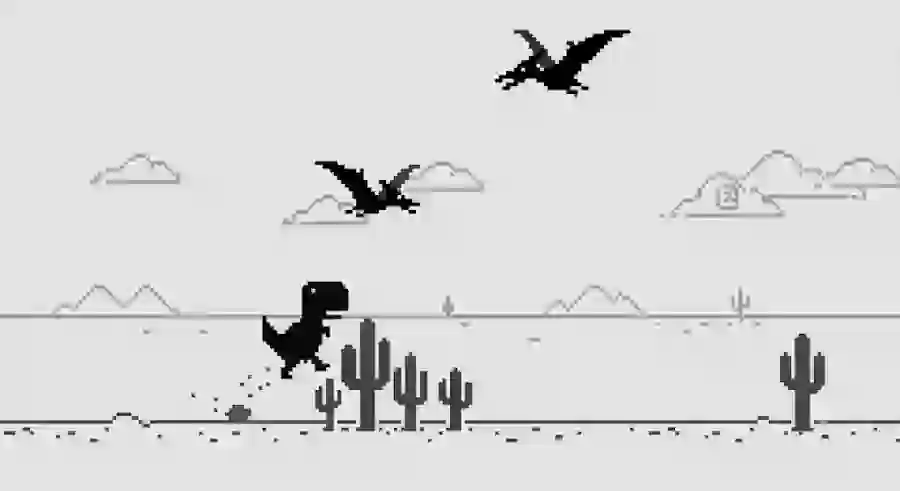
A small T-Rex runs across an empty desert. There are no complicated menus, no character upgrades, and no long tutorials. The objective is straightforward: survive as long as possible while avoiding obstacles.
However, behind its simple design is a carefully balanced endless runner system that gradually increases difficulty and tests the player's timing, focus, and reaction speed.
The game begins slowly, allowing new players to understand the basic controls. But as the score increases, every jump becomes more important, and every mistake can instantly end the run.
The beauty of the Chrome Dino Game lies in this simple formula:
Easy to learn, difficult to master.
Complete Chrome Dinosaur Game Controls Guide
The controls of the Chrome Dinosaur Game are intentionally minimal, making it accessible for almost every type of player.
Jump Controls
Players can make the T-Rex jump using:
- Spacebar
- Up Arrow Key (↑)
- Screen tap on mobile devices
Jumping is the most important action because it allows the dinosaur to avoid cacti and flying obstacles.
Timing matters more than speed. Pressing the jump button too early or too late can quickly end the game.
Duck Controls
The T-Rex can also crouch using:
- Down Arrow Key (↓)
This move becomes especially useful when dealing with flying Pterodactyls appearing at different heights.
A well-timed duck can help players avoid obstacles without interrupting their movement.
The Secret Power Move: Fast Drop Technique
One of the most useful techniques in the Chrome Dinosaur Game is the fast-drop move.
Many beginners only use the Down Arrow to avoid low-flying birds, but experienced players know it has another important purpose.
When the T-Rex is jumping through the air, pressing the Down Arrow forces it to return to the ground faster.
This technique becomes extremely valuable when:
- You jump too early over a cactus.
- Another obstacle appears immediately after landing.
- You need better control over your movement timing.
Without fast-drop, players may remain airborne too long and land directly into another obstacle.
Mastering this small trick can significantly improve high scores.
Understanding the Game's Increasing Difficulty
The Chrome Dinosaur Game does not stay at the same difficulty level forever.
Instead, Google designed the game to slowly increase pressure as the player's score grows.
At the beginning, the desert feels calm and predictable.
But after surviving for a while, the game introduces new challenges that require faster reactions and better decision-making.
Flying Pterodactyls Arrive Around 450 Points
The first major challenge appears when players reach approximately 450 points.
At this stage, flying Pterodactyls enter the game.
These prehistoric flying creatures add a completely new layer of difficulty because players must consider both ground and air obstacles.
Pterodactyls appear at three different heights:
Low Flying Pterodactyls
Low Pterodactyls require players to jump over them.
A poorly timed jump can cause the dinosaur to collide with the flying obstacle.
Medium Height Pterodactyls
Medium-level Pterodactyls are the most challenging because they force quick decisions.
Players must decide whether they should:
- Jump over the obstacle
- Duck underneath it
This requires fast thinking because hesitation usually results in a game-ending mistake.
High Flying Pterodactyls
High Pterodactyls are less dangerous because the T-Rex can usually continue running underneath them without taking action.
Experienced players learn to identify each height quickly and react accordingly.
Day and Night Mode Change Around 700 Points
One of the most interesting visual features of the Chrome Dinosaur Game appears around 700 points.
At this stage, the game enters a dark mode environment.
The bright desert background changes from white to black, creating the appearance of nighttime.
This feature does not change the gameplay mechanics, but it does affect player concentration.
The sudden visual transition can briefly disturb your timing because your eyes need a moment to adjust.
The game continues switching between day and night every 700 points, creating a repeating visual cycle throughout longer runs.
Although it is only a cosmetic feature, it adds variety and keeps the experience from feeling repetitive.
The Real Enemy: Increasing Speed
Many players believe obstacles are the hardest part of the Chrome Dino Game.
However, the biggest challenge is actually the increasing speed.
As time passes, the desert environment moves faster and faster.
The T-Rex runs more quickly, obstacles appear closer together, and players have less time to react.
Once you move beyond approximately 1,000 points, reaction windows become extremely small.
At this stage, success depends on:
- Muscle memory
- Concentration
- Accurate timing
- Remaining calm under pressure
A single unnecessary jump can end a long survival run.
How to Play Chrome Dinosaur Game Without Disconnecting Your Internet
Many people think they need to lose their internet connection to access the Dino Game.
That is not true.
Google included a direct shortcut that allows anyone to play the game anytime.
Follow these steps:
Method 1: Using Chrome Dino Shortcut
- Open a new tab in Google Chrome.
- Type:
chrome://dino
- Press Enter.
- Press the Spacebar to start playing.
The game will immediately launch.
Pro Tip: Access the Offline Error Screen Directly
Players can also reach the classic offline error page without actually disconnecting their internet.
Simply enter:
chrome://network-error/-106
into the Chrome address bar.
This opens the same offline-style screen where the dinosaur appears.
It is a convenient way to enjoy the game while staying connected.
Expert Strategies to Achieve Higher Scores
Although the Chrome Dinosaur Game depends heavily on reflexes, smart strategies can dramatically improve performance.
Professional players often focus less on speed and more on consistency.
Here are some techniques that separate beginners from high-score players.
1. Master the Fast-Drop Technique
As explained earlier, the Down Arrow is not only for avoiding flying obstacles.
Using it after jumping helps control the T-Rex's movement.
For example:
Imagine you jump over a cactus too early.
Without fast-drop, your dinosaur may stay in the air and fall directly into another obstacle.
With fast-drop, you can immediately return to the ground and prepare for the next challenge.
This small adjustment creates much better control.
2. Focus on Obstacles, Not the Dinosaur
A common mistake among beginners is constantly watching the T-Rex.
Experienced players do the opposite.
Instead of focusing on the dinosaur, train your eyes to watch the right side of the screen where obstacles appear first.
Looking ahead gives your brain more time to calculate:
- Whether a full jump is needed
- Whether a small jump is enough
- Whether ducking is the better option
The earlier you identify an obstacle, the better your reaction will be.
3. Avoid Random Spacebar Pressing
Many players panic when obstacles appear and start repeatedly pressing the Spacebar.
This strategy usually fails.
The Chrome Dinosaur Game does not include double jumping.
Once you are already in the air, additional jump commands do not create extra movement.
Every jump should have a purpose.
Calm and controlled actions will always outperform random button pressing.
Can You Actually Complete the Chrome Dinosaur Game?
The simple answer is:
No.
The Chrome Dinosaur Game is designed to continue almost forever.
It does not have a traditional ending screen or final level.
According to the original developers, the game's system is designed to reach a theoretical limit after approximately 17 million years of continuous gameplay.
The reason behind this number is connected to history.
Scientists estimate that the Tyrannosaurus Rex existed on Earth for around 17 million years before becoming extinct.
Google used this number as a playful reference when designing the game's limits.
Of course, no human player will realistically reach this point.
Unless someone creates a system that continues playing automatically for thousands of generations, every run will eventually end with a Game Over screen.
Hidden Developer Easter Egg: How to Activate God Mode
For players who enjoy experimenting, Chrome's developer tools reveal one of the game's most interesting secrets.
The internal code allows users to remove the Game Over function and make the T-Rex effectively invincible.
This is often called God Mode.
How to Enable Invincibility:
- Open:
chrome://dino
- Right-click anywhere on the page.
- Select Inspect.
(You can also press F12 to open Developer Tools.)
- Select the Console tab.
- Paste this JavaScript code:
var original = Runner.prototype.gameOver; Runner.prototype.gameOver = function(){}
- Press Enter.
- Close Developer Tools.
- Press Spacebar to start the game.
Your T-Rex will now pass through cacti and flying obstacles without dying.
Restoring Normal Gameplay
If you want to return the game to its original state, open the Console again and enter:
Runner.prototype.gameOver = original
The normal game mechanics will return immediately.
Industry Impact: Why the Chrome Dinosaur Game Became a Digital Icon
The Chrome Dinosaur Game represents an important lesson in modern digital design.
It proves that successful gaming experiences do not always require:
- High-end graphics
- Expensive development
- Complex storylines
- Multiplayer systems
Instead, Google created something memorable by focusing on one simple idea: turning frustration into entertainment.
The game transformed an ordinary browser error into a cultural experience.
It became a perfect example of minimalist design, where every element serves a purpose.
The pixel graphics create nostalgia.
The simple controls create accessibility.
The increasing difficulty creates replay value.
Together, these elements created a game that millions of people continue to enjoy years after its release.