How to Dominate Dress to Impress on Roblox With Faster Outfits, Better Layering, Smarter Voting and Pro Runway Strategies
Most players have experienced the same painful moment. You spend almost the entire round searching for the perfect pair of boots, realise you forgot to do your makeup, panic when the clock turns red, and end up walking the runway looking like a default avatar wearing one expensive accessory. The result? A devastatingly low star count.
Highlights
- Understand exactly how the 325-second round timer works.
- Build a reliable first-minute workflow.
- Use the 60/30/10 colour rule for polished outfits.
- Learn advanced layering techniques used by top-ranked players.
- Create memorable looks that attract 5-star votes.
- Avoid common beginner mistakes that destroy scores.
- Prepare for the runway before the countdown becomes a crisis.
How Dress to Impress Actually Works
At its core, DTI follows a simple but extremely competitive loop.
The Three Phases of Every Round
A Random Theme Appears
Each round begins with a theme displayed at the top of the screen. Examples include:
- Gothic Romance
- Coquette
- Y2K
- Cyberpunk Glam
- Nature
- Farm Life
The theme is intentionally broad, which means players can interpret it in completely different ways.
The Dressing Room Countdown Starts
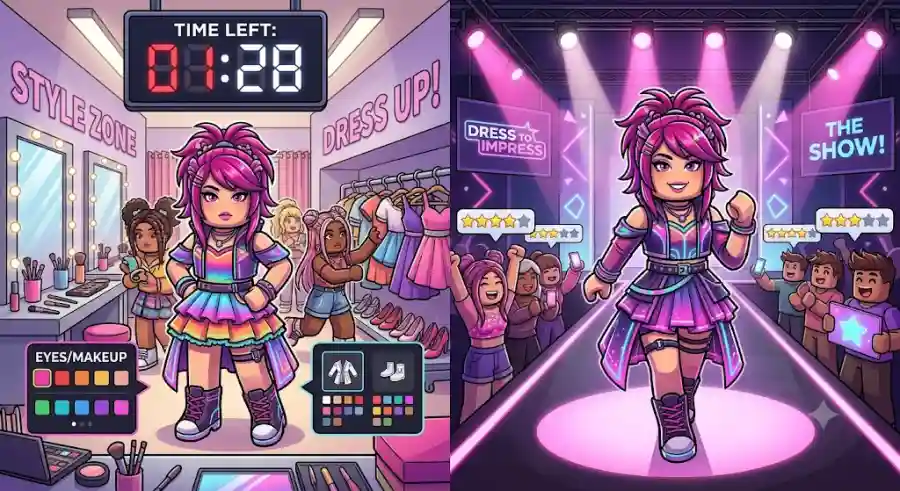
You receive 325 seconds, which is just under five and a half minutes, to create your entire look. During this time you must choose:
- Skin tone
- Hair
- Makeup
- Tops
- Bottoms or dresses
- Shoes
- Accessories
- Colours and patterns
The Runway and Voting Phase
When the timer expires, every player is teleported to the runway. Participants showcase their outfits, perform poses, and vote on other players using a 1-to-5 star system.
The player with the highest total receives:
- Pink Cash
- Rank points
- Better progression toward higher fashion tiers
Why the Timer Is the Real Final Boss
Most people assume the challenge is creating a beautiful outfit. In reality, the harder task is creating a coherent outfit under pressure.
You could build an incredible look in ten minutes. DTI asks you to do it in a little over five.
That is why experienced players do not improvise every round. They follow a repeatable system that reduces decision fatigue and prevents panic.
Speed-Dressing 101: The First 60 Seconds
The opening minute decides most rounds.
A huge number of beginners sprint directly toward the dresses and jackets the moment the theme appears. That usually leads to a messy outfit because they leave hair and makeup for the final seconds.
Step 1: Set Your Canvas First
Before selecting any clothing, head straight to the tanning booths and makeup stations.
Choose:
- Your skin tone
- Eye shape
- Makeup palette
- Lip colour
- Blush and contour (if desired)
This is one of the most important habits in the game.
When you build the face first, your outfit colours naturally complement the overall vibe. If you leave makeup until the end, you often end up forcing mismatched colours together while the countdown is flashing.
Why This Works
Professional stylists usually start with the overall concept before choosing accessories. DTI rewards the same approach. A strong face and colour direction make every clothing choice easier.
Step 2: Establish Your Base Hair
Hair is far more powerful in DTI than many new players realise.
One of the game’s biggest advantages is that you can stack multiple hairstyles together. This allows you to create custom looks that appear much more detailed than a single hairstyle.
A Reliable Hair Workflow
- Pick a main hairstyle that matches the theme.
- Add bangs if they improve the silhouette.
- Add extensions or volume pieces if time allows.
For example:
- Coquette: soft curls + curtain bangs
- Y2K: straight layered hair + chunky front pieces
- Gothic Romance: long dark waves + dramatic bangs
- Cyberpunk Glam: sharp ponytail + colourful streaks
Even simple outfits look more expensive when the hair has dimension.
The 60/30/10 Colour Rule
Once your base is ready, move to clothing.
A common mistake is using too many competing colours and patterns. On the runway, chaotic outfits are difficult for other players to read quickly.
The Rule
60% Primary Colour
Use this for the largest pieces:
- Dress
- Jacket
- Trousers
- Skirt
30% Secondary Colour
Use this for supporting elements:
- Shoes
- Under-layers
- Hair accents
- Gloves
10% Accent Colour
Use this for high-impact details:
- Jewellery
- Nails
- Belts
- Small patterns
- Bright highlights
Why It Looks More Professional
Human eyes naturally prefer a clear visual hierarchy.
For example:
- Black dress (60%)
- Silver boots and gloves (30%)
- Deep red lipstick and earrings (10%)
This combination feels intentional and editorial.
Compare that with an outfit that uses neon green, hot pink, bright blue, orange plaid, and leopard print all at once. Even if each item is individually cute, the overall result often appears unfocused.
A practical DTI rule is:
Two solid colours + one subtle pattern almost always beats a full rainbow outfit.
The Secret Behind Viral DTI Fits: Advanced Layering
If you watch high-ranked players in any lobby, you will notice something interesting.
Their outfits are rarely just one dress and a pair of shoes.
The real magic of Dress to Impress is layering.
What Layering Actually Means
Layering is the process of combining multiple clothing items to create a completely new silhouette.
This is the technique that makes many viral TikTok and YouTube DTI outfits look so much more detailed than standard beginner fits.
Tops + Outerwear
Start with a fitted base top, then add an open jacket, cardigan, corset, or shrug.
Examples:
- Cropped tee + oversized jacket
- Corset + sheer shrug
- Tank top + leather jacket
- Fitted blouse + arm warmers
These combinations create depth and make the outfit look intentionally styled rather than randomly assembled.
Skirts Over Pants
One of the strongest runway tricks is wearing a sheer or pleated skirt over fitted trousers.
This creates an editorial, streetwear-inspired silhouette that immediately stands out.
It works especially well for:
- Cyberpunk Glam
- Y2K
- Streetwear
- Futuristic
- High Fashion
- Avant-Garde themes
Because most players choose either a skirt or pants, combining both gives your outfit a more custom appearance.
Toggles Are Hidden Gold
Many DTI items include alternate versions that are easy to miss.
Hover over an item and check its toggle options. You may be able to:
- Remove sleeves
- Shorten boots
- Change skirt length
- Add or remove straps
- Switch textures
- Convert a full item into a completely different silhouette
Top players constantly use these hidden variations.
A boot that looks ordinary in its default form might become the perfect ankle bootie after a single toggle change.
Avoid the Clipping Disaster
Layering adds depth, but too many overlapping meshes can cause clothing textures to clip through each other.
Before leaving a station:
- Zoom in closely.
- Rotate your avatar 360 degrees.
- Check the front, sides, and back.
- Look for sleeves, skirts, or accessories cutting through other items.
Nothing ruins a strong outfit faster than a floating sleeve sticking through a jacket during the runway walk.
Think Beyond the Obvious Theme
This is where many winning rounds are decided.
When the theme is “Farm Life,” a large portion of the server will choose the exact same cowgirl outfit.
If you want 5-star attention, give players something memorable.
Better Theme Interpretation
Instead of:
- Standard cowgirl
- Generic farmer
- Default overalls
Consider:
- A literal chicken
- A scarecrow
- A sunflower-inspired fashion look
- A beekeeper
- A harvest fairy
- A cartoon-style farm character
For a Nature theme, some players even recreate characters such as The Lorax.
Humour and recognisable references often receive more attention than safe, predictable interpretations.
Use Chat to Help the Judges
If your reference is slightly niche, tell the lobby.
Examples:
- “Doing a Velma from Scooby-Doo look!”
- “This is a cyberpunk princess.”
- “Inspired by early 2000s pop stars.”
A quick message helps younger players understand the concept before they vote.
That extra context can be the difference between 3 stars and 5 stars.