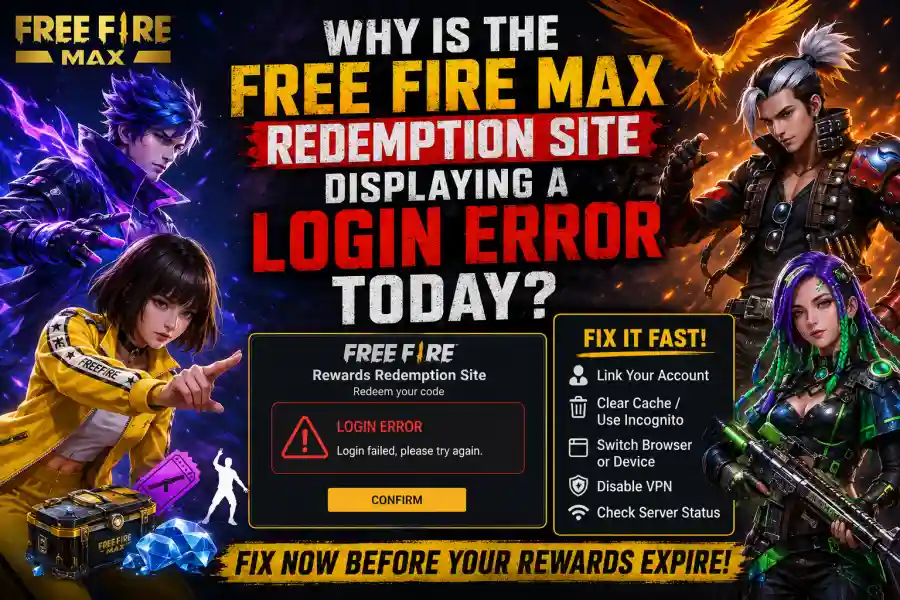
Free Fire MAX Redeem Site Login Not Working? Here’s Why It Happens and How to Fix It Before Your Rewards Expire
It becomes even more annoying because redeem codes are available for only a limited time. Some expire within hours, while others become unavailable after reaching their maximum redemption limit. Every minute spent troubleshooting increases the chance of missing out on exclusive weapon skins, diamond vouchers, emotes, character bundles, crates, and other premium rewards.
Highlights
- Understand why the Free Fire MAX redemption website refuses to log you in.
- Learn the most common causes behind today's login failures.
- Follow five proven troubleshooting methods that work for most players.
- Discover why guest accounts cannot redeem rewards.
- Learn how browser cache, VPNs, and third-party authentication affect the login process.
- Understand other redemption errors that may appear even after logging in successfully.
- Know when the problem is on Garena's servers and when waiting is the only solution.
Understanding How the Free Fire MAX Redemption Site Works
Before jumping into the fixes, it helps to understand how Garena's redemption system actually works.
Unlike the game itself, the Rewards Redemption Site is entirely web-based. Instead of logging in using an in-game username and password, the website verifies your identity through trusted third-party platforms.
These authentication providers include:
- Apple ID
- X (formerly Twitter)
- VK
When you attempt to sign in, the redemption portal doesn't verify your credentials directly. Instead, it communicates with these third-party authentication services, confirms your identity, links your game account, and only then allows reward redemption.
Because multiple services are involved in a single login request, even a temporary interruption anywhere in that chain can result in a failed login attempt.
That is why players often experience login errors even when their game itself is working perfectly.
The Core Problem: Why the Site Is Failing to Log You In
Several different issues can trigger authentication failures. Some are caused by Garena's own servers, while others originate from your browser, account configuration, or even the authentication provider you're using.
Let's look at each one in detail.
1. Heavy Server Traffic During New Redeem Code Releases
One of the most common reasons behind login errors is simple server overload.
Whenever Garena releases highly anticipated redeem codes, millions of players around the world immediately rush to the Rewards Redemption Site.
Everyone wants to claim exclusive rewards before the codes expire or hit their redemption limits.
This sudden spike in traffic places enormous pressure on Garena's authentication servers.
As a result, players may experience:
- Login Failed messages
- Authentication timeout errors
- Endless loading screens
- Frozen webpages
- Failed redirects
- Website crashes
In many cases, there is nothing wrong with your account.
The server simply cannot process the overwhelming number of login requests arriving at the same moment.
This situation is especially common during:
- Major seasonal events
- Anniversary celebrations
- Esports tournaments
- New character launches
- OB patch releases
- Large promotional campaigns
If thousands—or even millions—of players attempt to redeem codes simultaneously, temporary login failures become almost unavoidable.
2. Outdated Browser Cache and Session Data
Modern browsers store temporary files to make websites load faster.
These files include:
- Cached images
- Cookies
- Login sessions
- Website preferences
- Authentication tokens
Normally, this improves browsing speed.
However, problems arise when Garena updates the backend of its redemption portal or when your previous login session expires incorrectly.
Instead of requesting fresh authentication data, your browser may continue trying to use outdated session information.
This creates a conflict between your browser and Garena's updated servers.
Common symptoms include:
- Continuous login loops
- White pages
- Failed authentication
- Redirect errors
- Login button not responding
- Endless loading animation
This issue is especially common after recent website updates.
Fortunately, it is also one of the easiest problems to solve.
3. Guest Account Limitations
Many newer players begin playing Free Fire MAX without linking their account to a permanent login platform.
Instead, they use a guest account.
While this allows immediate gameplay, it comes with several restrictions.
One of the biggest limitations is reward redemption.
Garena's Rewards Redemption Site does not support guest accounts.
Because guest profiles are stored locally rather than securely linked to an authentication provider, the redemption portal has no reliable method to identify and verify the account.
As a result, login attempts fail immediately.
If your account has never been connected to Google, Facebook, Apple ID, VK, or another supported platform, redeeming rewards simply isn't possible until the account is permanently linked.
4. Third-Party Authentication Problems
Garena relies heavily on external authentication providers.
Instead of creating a separate login system, it depends on services like:
- Apple
- X
- VK
Although these platforms are generally reliable, temporary issues do occur.
Even a minor routing issue or authentication delay on Facebook's servers can prevent Garena from confirming your identity.
Likewise, Google authentication may temporarily fail because of:
- Expired login sessions
- Browser permission conflicts
- Account synchronization issues
- Cookie restrictions
- Security verification delays
When this happens, the redemption website often displays vague error messages such as:
- Login Failed
- Authentication Error
- Unable to Verify Account
- Please Try Again Later
The problem may not actually originate from Garena at all.
Instead, it could be a temporary issue affecting the authentication provider you're using.
How to Fix the Free Fire MAX Redemption Site Login Error Today
Fortunately, most login problems can be resolved within a few minutes.
The following troubleshooting methods have helped countless players successfully access the redemption portal.
Step 1: Link Your Account If You're Using a Guest Profile
This is the first thing every guest account user should do.
Without linking your account, reward redemption is impossible.
To link your account:
- Open Free Fire MAX.
- Tap the Settings icon.
- Open the Basic tab.
- Select a permanent login provider.
- Choose Google, Facebook, Apple ID, or VK.
- Complete the account linking process.
- Return to the Rewards Redemption Site.
- Attempt to log in again.
Once the account has been successfully connected, the redemption portal should recognize your profile properly.
Step 2: Clear Browser Cache or Use Incognito Mode
Sometimes the quickest fix takes less than one minute.
Instead of spending time clearing every browser setting, simply open a fresh Incognito or Private Browsing window.
Then visit:
Because Incognito mode ignores stored cookies and cached session data, it forces the website to establish an entirely new authentication session.
If that works, you've confirmed that cached browser data was causing the issue.
For a permanent solution:
- Open browser settings.
- Clear browsing history.
- Delete cookies.
- Remove cached images and files.
- Restart the browser.
- Visit the redemption website again.
This refreshes your browser's stored information and eliminates outdated authentication conflicts.