Roblox Moderated Item Refund Recover Deleted Item Robux Safely and Avoid Scams
If you have ever lost Robux because an item was moderated or deleted after purchase, this guide explains exactly how the Roblox Moderation Refund Policy works, how to trigger your refund request, what to do if the automated system fails, and how to avoid the massive wave of fake Robux refund scams spreading online.
Main Highlights
What You’ll Learn in This Guide
- Why Roblox deletes purchased items
- How the hidden moderated-item refund system works
- Where to find refund approval messages
- How to manually request missing Robux
- When Roblox account rollbacks apply
- How scammers fake Robux refund tricks
- The safest ways to protect your account and currency
Why Roblox Deletes Purchased Items
The Roblox Marketplace is one of the biggest user-generated economies in gaming. Thousands of creators upload clothing, accessories, faces, layered outfits, and other UGC items every single day.
While this creative freedom is part of what makes Roblox so popular, it also creates moderation problems.
Sometimes creators upload content that violates Roblox rules, intentionally or accidentally. When moderation teams review those assets, the items can be removed entirely from the platform — even after thousands of players already purchased them.
That is why users occasionally discover deleted assets in their inventory weeks or even months later.
Common Reasons Roblox Moderates and Deletes Items
Copyright Violations
One of the most common reasons involves unauthorized branding or stolen intellectual property.
For example:
- Nike logos
- Adidas branding
- Marvel character art
- Anime graphics
- Luxury fashion replicas
Creators who upload copyrighted designs without permission risk having their content removed permanently.
Inappropriate or Rule-Breaking Content
Roblox also removes items that violate platform safety policies. This may include:
- Offensive imagery
- Inappropriate clothing
- Explicit content
- Harmful symbolism
- Bypassed moderation designs
Because Roblox heavily prioritizes younger audiences, moderation systems can be extremely strict.
Broken or Exploited Assets
Some UGC items are deleted because they interfere with gameplay or avatar systems. These may include:
- Physics-breaking accessories
- Glitched layered clothing
- Invisible hitbox items
- Exploit-related assets
- Rendering issues
Even if players bought the item legitimately, Roblox may still remove it platform-wide.
The “Hidden” Roblox Refund Method Explained
Here is the part many players never discover.
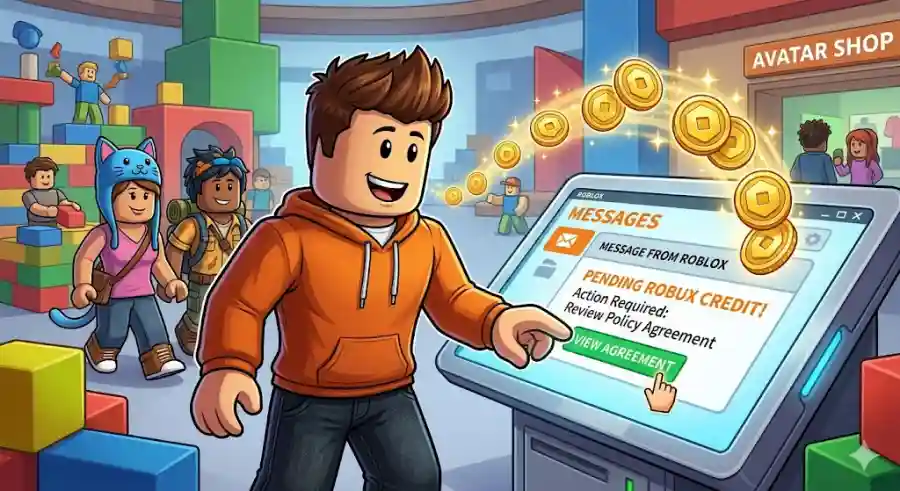
When Roblox deletes an item you purchased, the platform may actually offer you a Robux reimbursement automatically. However, instead of directly returning the currency, Roblox sends a special agreement request through your account inbox.
Because these messages are easy to overlook, thousands of players never realize they are eligible for refunds.
The process is fully official and tied to Roblox’s Moderated Item Robux Policy.
Step-by-Step Guide to Recover Lost Robux
Step 1: Open Your Roblox Inbox
First, log into your Roblox account using either:
- Desktop browser
- Mobile app
- Tablet version
Once logged in, locate the Messages or Inbox icon, usually represented by an envelope near the navigation menu.
Carefully review your system messages.
You are looking for a notification sent directly by Roblox with wording similar to:
The exact wording can vary slightly, but the message will clearly mention moderation, deleted content, or pending Robux credit.
Many users miss these alerts because they blend in with normal Roblox system notifications.
Step 2: Open the Moderated Item Policy Link
After opening the message, Roblox will explain that one or more purchased items were moderated and removed from the platform.
Inside the message, you should see a clickable link directing you to the Moderated Item Robux Policy page.
Click that link carefully.
This page is the official gateway for initiating your refund eligibility approval.
Step 3: Read the Agreement and Click “I Agree”
The page may initially look intimidating because it contains legal language and policy explanations.
In simple terms, Roblox is asking you to confirm two things:
- You purchased an item that was later deleted
- You were not knowingly involved in creating or abusing rule-breaking content
This helps Roblox prevent fraudulent refund abuse from malicious creators trying to exploit the system.
Once you finish reviewing the page, click the “I Agree” button at the bottom.
That action officially submits your refund request into Roblox’s processing system.
Step 4: Wait for the Robux to Return
One of the biggest misconceptions is that Robux returns instantly.
In reality, Roblox typically places the request into a moderation audit queue. The platform then reviews purchase history and validates refund eligibility before issuing reimbursement.
Typical Refund Processing Times
Most players receive returned Robux within:
- 24 hours
- 2–3 business days
- Up to one week in some cases
Processing speed can vary depending on account activity, moderation load, and the number of deleted items attached to your history.
Pro Tip: Check Older Messages for Hidden Refunds
If you frequently buy:
- Avatar clothing
- UGC accessories
- Limited cosmetics
- Trend-based outfits
…there is a strong chance you have older refund notices buried in your inbox history.
Many Roblox players never scroll back far enough to discover multiple unclaimed moderation refunds sitting unnoticed for months.
Checking older system messages can sometimes uncover a surprisingly large amount of recoverable Robux.
For veteran players with years of purchase history, this hidden inbox search can genuinely pay off.
What If You Never Received the Refund Message?
Sometimes Roblox moderation removes items without triggering the automated inbox notification.
That does not necessarily mean you are ineligible.
In these situations, players can manually request an account review through Roblox Support.
How to Contact Roblox Support for Missing Refunds
Step 1: Visit the Official Support Page
Go to the official Roblox Support website and open the support request form.
Always make sure you are using the legitimate Roblox domain before entering account details.
Step 2: Enter Your Account Information
Fill in your:
- Roblox username
- Email address
- Device details if requested
Use the email connected to your Roblox account whenever possible.
Step 3: Choose the Correct Support Categories
Under the Help Category section, select:
Billing & Payments
Then choose a related option such as:
- “I made a purchase and didn’t receive it”
- “Robux Related”
Selecting the correct category improves the chances of faster review routing.
Step 4: Write a Clear and Polite Explanation
Professional and respectful messages usually perform far better than angry complaints.
Here is an example format:
Clear communication helps support agents understand the issue quickly.
Step 5: Wait for a Response
Roblox Support generally responds within:
- 1–2 business days
- Sometimes longer during high-traffic periods
Keep an eye on both your inbox and spam folder for replies.
Understanding Roblox Account Rollbacks
There is another legitimate recovery system many players hear about: the Roblox Account Rollback.
Unlike moderation refunds, rollbacks are specifically designed for hacked or compromised accounts.
When Does Roblox Offer Account Rollbacks?
If someone gains access to your account and:
- Steals limited items
- Trades away collectibles
- Buys fake gamepasses
- Wastes your Robux
- Empties your inventory
…Roblox may restore your account to an earlier state.
This process essentially rewinds your inventory and balance to how it appeared before the security breach occurred.
However, strict rules apply.
The Biggest Limitation: One Rollback Per Lifetime
Roblox only grants:
ONE account rollback per account lifetime
That means if your account gets compromised again later, Roblox will usually refuse additional restoration requests.
Because of this limitation, security becomes extremely important after recovery.
Protect Your Roblox Account Immediately
After any refund or rollback situation, players should enable stronger account protection features immediately.
Essential Security Steps
Enable Two-Step Verification (2FA)
This adds an extra login protection layer using email or authentication apps.
Create a Strong Password
Avoid:
- Common phrases
- Simple numbers
- Reused passwords
Never Share Login Information
Legitimate Roblox staff will never ask for:
- Passwords
- Security cookies
- Authentication codes
The Rise of Fake Robux Refund Scams
The popularity of Robux recovery content has created a massive scam market online.
YouTube videos, TikTok clips, Discord servers, and fake websites constantly promote “secret refund generators” or “unlimited Robux exploits.”
Almost all of them are fraudulent.
Understanding how these scams work can protect both your account and personal information.
Common Roblox Refund Scams Explained
| Scam Type | How It Works | The Truth |
|---|---|---|
| Robux Generators | Websites promise unlimited free Robux or refund injections | Designed to steal passwords or force malware-filled survey completions |
| Inspect Element Tricks | Videos edit browser code to fake Robux balances | Only visual changes; refreshing resets everything |
| Fake Support Scripts | Users copy aggressive legal threats to send Roblox Support | Can result in ignored tickets or account penalties |
| Cookie Theft Links | Scam pages ask for .ROBLOSECURITY cookies | Gives hackers full account access |
| Fake Browser Extensions | Extensions claim to unlock hidden refunds | Often contain spyware or credential stealers |
Why “Inspect Element” Videos Fool So Many Players
One of the oldest Roblox scams involves editing browser text using Inspect Element tools.
In these videos, creators appear to magically change their Robux balance from something small like:
- 50 Robux
to:
- 999,999 Robux
within seconds.
What viewers often do not understand is that these edits only change the visual display locally inside the browser window. Roblox servers never register the fake amount.
The moment the page refreshes, the balance returns to normal.
No real currency was ever added.
The Golden Rule of Roblox Safety
Here is the simplest way to avoid almost every Robux scam online:
If it does not happen on the official Roblox domain, do not trust it.
Never give your:
- Password
- Email verification codes
- .ROBLOSECURITY cookie
- Personal information
to any third-party website, Discord bot, extension, or “refund tool.”
Legitimate refunds only happen through official Roblox systems.
Why This Refund System Matters for Players
The Roblox Moderated Item Refund Policy may not be widely advertised, but it represents something important for the platform’s economy.
Roblox depends heavily on user-generated content. That means moderation mistakes and creator violations are inevitable.
Without refunds, players would unfairly lose currency for purchases they made in good faith.
This system helps maintain:
- Player trust
- Marketplace fairness
- Consumer confidence
- Safer UGC ecosystems
For a platform with millions of daily transactions, even small refund protections matter enormously.
Industry Impact: Why UGC Moderation Is Becoming More Important
Roblox’s economy has evolved far beyond simple avatar clothing.
Today’s Roblox marketplace includes:
- Professional UGC creators
- Brand collaborations
- Limited collectibles
- Creator monetization programs
- Virtual fashion ecosystems
As digital item economies become more valuable, moderation systems and refund protections are becoming increasingly important across the gaming industry.
Games like Fortnite, Roblox, and other live-service platforms now manage virtual economies worth millions of dollars annually.
That means transparency and consumer protections are no longer optional — they are expected by players.
Losing Robux because of deleted items can feel incredibly frustrating, especially for players who spend months saving currency for premium cosmetics or avatar upgrades.
The good news is that Roblox does offer an official solution through its Moderated Item Refund Policy. While the system is somewhat hidden inside account messages and policy pages, it can successfully return currency for moderated purchases if players know where to look.