Redeem Hidden Items, Flex UGC Rewards and Exclusive Avatar Accessories
Whether you're searching for rare Flex UGC rewards, exclusive accessories, limited-time cosmetics, or community-created avatar designs shared through custom outfit IDs, understanding the redemption system is essential.
Highlights
- Learn how to redeem promo codes in Catalog Avatar Creator.
- Unlock hidden accessories, hairstyles, badges, and exclusive UGC items.
- Understand the difference between Promo Codes and Outfit IDs.
- Discover the official code redemption process.
- Fix common code redemption errors quickly.
- Learn where developers and creators share hidden CAC codes.
- Stay updated on limited-time rewards and special Roblox events.
Understanding Catalog Avatar Creator Codes
Before entering any code, it's important to understand that Catalog Avatar Creator uses two completely different code systems.
Many players confuse them, which often leads to frustration when a code doesn't work as expected.
Type 1: UGC and Promo Codes
These are special text-based codes distributed by developers, event organizers, and UGC creators.
Examples may include codes such as:
- STARFREE
- PURPLEGAS
These promotional codes are specifically designed to unlock:
- Hidden accessories
- Exclusive hairstyles
- Limited-edition UGC items
- Event rewards
- Special badges
- Creator-exclusive cosmetics
In many cases, these rewards are only available for a limited time, making them highly desirable among Roblox collectors.
Type 2: Outfit IDs and Catalog IDs
The second category consists of outfit-sharing codes.
These are usually long numerical strings or specific alphanumeric identifiers generated when a player saves and shares a complete avatar setup.
When entered correctly, these IDs instantly load an entire avatar configuration, including:
- Clothing
- Accessories
- Hairstyles
- Faces
- Layered clothing
- Additional cosmetic elements
Instead of unlocking a single reward, outfit IDs allow players to instantly wear a complete community-created style.
While both systems use codes, they serve very different purposes.
For the purpose of this guide, the primary focus is on Promo Codes and Flex UGC Codes, which unlock hidden accessories and exclusive rewards.
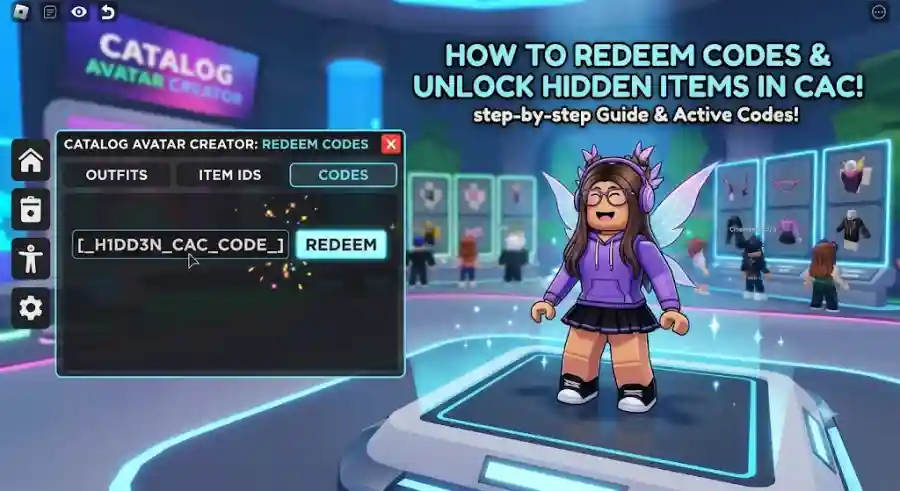
Step-by-Step Guide: How to Enter Promo Codes in Catalog Avatar Creator
Redeeming codes in Catalog Avatar Creator is relatively straightforward once you know where to find the correct menu.
Follow the steps below carefully to claim your rewards.
Step 1: Launch Catalog Avatar Creator
Start by opening Roblox and launching Catalog Avatar Creator.
Make sure you're joining the official experience created by Muneeb. Using the official version ensures:
- The interface matches current instructions
- Rewards are properly saved
- Promotional items are correctly applied to your account
- New updates and features are available
Loading into unofficial copies or outdated versions may result in missing features or redemption issues.
Step 2: Open the Main Menu
After entering the game, direct your attention to the left side of the screen.
You should see a vertical collection of menu icons.
Depending on your platform, the location of certain options may vary slightly.
Look for either:
- The Chat or Community icon
- The Settings icon
- The Effects menu
- Additional navigation buttons
PC and mobile interfaces can sometimes display menu options differently, so don't be surprised if the layout varies slightly.
Pro Tip for Community Outfit Codes
If your goal is to load a shared avatar design instead of redeeming a promotional reward, select the Community Outfits option.
This section opens a search interface containing a dedicated code field where players can enter outfit IDs and browse community-created looks.
Step 3: Locate the Codes or Flex UGC Menu
Once you've opened the appropriate menu, look for a section labeled:
- Codes
- Promo Codes
- Flex UGC
- Enter Code
The exact wording may differ depending on the event or current game update.
Some creator-hosted events introduce temporary interfaces that display a special code redemption box.
When a special promotion is active, a dedicated input field usually appears on-screen, making it easy for players to redeem rewards.
If a creator is running a limited-time campaign, this section may be highlighted more prominently than usual.
Step 4: Enter and Redeem Your Code
Carefully type your promotional code into the available text field.
Accuracy is extremely important.
Most Catalog Avatar Creator promo codes are case-sensitive, meaning capitalization matters.
To avoid mistakes:
- Copy the code directly from its source whenever possible.
- Double-check every letter and number.
- Avoid adding extra spaces before or after the code.
- Ensure special characters are entered correctly if applicable.
After entering the code:
- Press Enter.
- Click the Redeem button.
- Wait for the verification process.
If the code is valid, you should immediately receive a confirmation message.
Successful redemptions typically trigger a pop-up notification displaying:
- The unlocked accessory
- A reward confirmation
- Badge information
- Inventory updates
Your newly unlocked item will then become available within your avatar customization options.
Why Your Catalog Avatar Creator Code Might Not Work
Nothing is more frustrating than finding a hidden code only to receive an error message.
Fortunately, most redemption issues have simple explanations.
Let's examine the most common causes.
1. The Code Has Expired
This is the most common reason for failed redemptions.
Many UGC creators release rewards with limited availability.
Examples include:
- First 5,000 claims
- First 10,000 claims
- Weekend-only promotions
- Seasonal event rewards
Once the claim limit has been reached or the event period ends, the code becomes invalid.
Even if you enter it correctly, the system will reject the code.
Because Roblox promotional campaigns move quickly, timing often makes the difference between success and disappointment.
2. Missing Group or Follow Requirements
Many hidden items require additional steps before activation.
Developers and UGC creators frequently use codes as rewards for community engagement.
Common requirements include:
- Joining a Roblox group
- Following a creator
- Supporting a UGC artist
- Participating in community events
If a code appears valid but refuses to activate, check the creator's social media pages or Roblox group announcements.
You may have missed a prerequisite requirement.
This is one of the most overlooked reasons for redemption failures.
3. Game Pass Restrictions
Some premium rewards are tied to specific game passes.
Certain hidden items can only be redeemed if you already own:
- A designated game pass
- Premium accessory bundles
- Special event passes
- Higher-tier cosmetic packages
For example, some hidden rewards require ownership of a specific 350-pass or related premium content before activation becomes available.
Always review the reward requirements before assuming a code is broken.
4. Typing Mistakes and Formatting Errors
Even experienced players occasionally make simple input mistakes.
Common errors include:
- Extra spaces
- Missing letters
- Incorrect capitalization
- Copy-and-paste formatting issues
- Confusing "O" with "0"
- Confusing "I" with "1"
These small mistakes are enough to cause a redemption failure.
When in doubt, delete the entry and type the code again carefully.
Where to Find Hidden Catalog Avatar Creator Promo Codes
The hardest part of unlocking hidden items is often finding active codes before they expire.
Since rewards can disappear quickly, staying connected to the right communities is essential.
Here are the best places to look.
YouTube and TikTok Roblox Creators
Many UGC developers partner with content creators to distribute exclusive rewards.
Popular Roblox creators frequently receive early access to promotional codes that they share with their audiences.
These partnerships help creators promote:
- New accessories
- Limited UGC launches
- Seasonal events
- Community challenges
Channels run by creators such as SharkBlox and MillieJane are widely recognized by Roblox players for sharing useful updates, hidden items, and newly released accessory codes.
Checking creator content regularly can help you discover rewards before they become widely known.
Join the Official Catalog Avatar Creator Roblox Group
The official Catalog Avatar Creator group remains one of the most valuable resources available.
Benefits often include:
- Community discussions
- Code announcements
- Event information
- Shared outfit IDs
- Hidden asset discoveries
- Exclusive member opportunities
The group's community wall frequently becomes a hub where players exchange information about newly discovered rewards and active promotional campaigns.
For dedicated collectors, joining the group is almost mandatory.
Follow Developers and UGC Creators on Twitter/X
Social media remains one of the fastest ways to discover fresh promotional codes.
Developers often celebrate milestones by releasing surprise rewards.
Common occasions include:
- Major update launches
- Seasonal events
- Halloween celebrations
- Christmas events
- Community achievement milestones
- Player count records
Following Muneeb and prominent Roblox UGC artists can provide early access to announcements before they spread throughout the wider community.
The faster you see a code announcement, the better your chances of successfully claiming limited-stock rewards.
Why Promo Codes Matter in Catalog Avatar Creator
Catalog Avatar Creator is built around creativity and self-expression.
Every accessory, hairstyle, face item, and cosmetic addition contributes to a player's unique identity inside Roblox.
Promo codes add another layer of excitement because they offer items that aren't available through traditional browsing.
For many players, these rewards become collectible status symbols.
They provide opportunities to:
- Showcase exclusive fashion pieces
- Stand out from other players
- Access rare limited-time content
- Expand customization possibilities
- Experiment with unique avatar combinations
In a platform where individuality matters, hidden rewards often become some of the most sought-after collectibles.
Industry Impact: Why Catalog Avatar Creator Continues to Thrive
The rise of user-generated content has transformed Roblox into one of the largest virtual fashion ecosystems in gaming.
Catalog Avatar Creator sits at the center of this trend.
The game allows players to preview and experiment with millions of avatar combinations without immediately spending Robux. This functionality has made CAC a favorite among fashion-focused Roblox users.
The addition of promo codes, Flex UGC rewards, creator events, and community outfit sharing further strengthens player engagement.
Rather than simply browsing items, players actively participate in hunts, events, and social communities to discover exclusive rewards.
This combination of creativity, accessibility, and community involvement helps explain why Catalog Avatar Creator remains one of Roblox's most popular avatar experiences.
Why This Guide Matters
Many players spend hours searching for hidden accessories without realizing that some rewards require promo code redemption.
Understanding how the system works allows you to:
- Unlock exclusive items faster
- Avoid common redemption mistakes
- Stay ahead of limited-time events
- Build a more unique avatar collection
- Maximize your Catalog Avatar Creator experience
Whether you're a casual fashion enthusiast or a dedicated UGC collector, mastering the promo code system opens the door to some of the game's most exciting hidden content.