Unlock Free Games, Skins, Currency Packs and Exclusive Rewards Without Falling for Scams or Fake Redemption Links

Two of the biggest names offering these benefits are Amazon Prime Gaming and Discord Nitro. Active subscribers can unlock a wide range of monthly rewards, including free games, in-game content bundles, promotional passes, and limited-time gaming bonuses.

Prime Gaming vs Discord Nitro Perks: Complete Comparison

Before claiming rewards, it is important to understand how Amazon Prime Gaming and Discord Nitro provide their benefits. Although both services offer gaming-related bonuses, their reward systems work differently.

FeaturePrime Gaming (Amazon)Discord Nitro
Primary Loot TypesFree monthly PC games, in-game bundles, currency packs, exclusive skins, and digital bonusesNitro Gift Inventory codes, partner trial passes such as Xbox Game Pass and YouTube Premium, and in-game reward items
Supported PlatformsPC, Xbox, PlayStation, Nintendo Switch, Amazon LunaPC, Xbox, PlayStation, Mobile
Claim LocationOfficial Prime Gaming web portal (gaming.amazon.com)Discord Desktop App or Web (User Settings > Gift Inventory or Nitro Home)
Delivery MethodDirect OAuth account synchronization or manual redemption keysPromotional codes or verified browser redirect links

While Prime Gaming focuses heavily on Amazon’s subscription ecosystem, Discord Nitro works more like a community-based premium membership program that frequently partners with gaming companies and digital service providers.

Both platforms can provide valuable rewards, but both require users to be careful while connecting accounts.

What Is Prime Gaming and How Does It Deliver Rewards?

Amazon Prime Gaming is included with an active Amazon Prime subscription and provides members with rotating monthly gaming benefits. These rewards can include complete PC games, exclusive cosmetic items, bonus content packs, and digital currency.

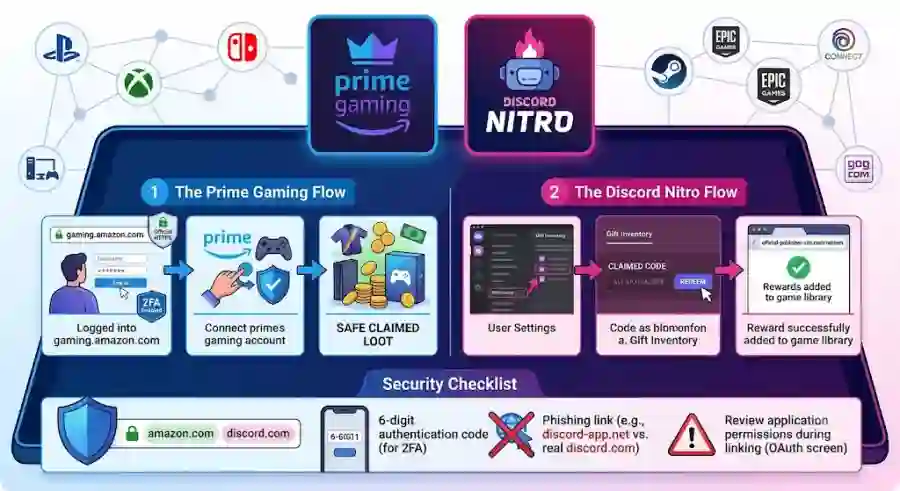
Prime Gaming mainly delivers rewards through two methods:

1. Direct Account Linking

The first method uses automatic account synchronization. Instead of manually entering a code, players connect their publisher or gaming accounts directly with Amazon.

For example, some rewards for games such as VALORANT or EA Sports FC can appear automatically after users successfully link their accounts.

This process usually works through OAuth authentication, where Amazon sends users to the official login page of the game publisher. Players approve the connection, and the reward becomes attached to their gaming profile.

2. Redemption Keys

The second method involves receiving a unique code that must be entered manually on another platform.

These codes are commonly used for storefronts and launchers such as:

  • Steam
  • Epic Games Store
  • GOG
  • Ubisoft Connect

After claiming a reward, users receive an alphanumeric key that can be copied and redeemed through the correct gaming platform.

Because these processes involve external websites, account verification becomes extremely important.

How to Safely Claim Amazon Prime Gaming Rewards

Claiming Prime Gaming rewards is straightforward when users follow official steps and avoid suspicious links.

Step 1: Visit the Official Prime Gaming Portal

The safest way to begin is by opening a fresh browser window and manually entering:

gaming.amazon.com

Avoid clicking Prime Gaming links from random emails, social media posts, advertisements, or unknown websites claiming to offer “exclusive free Prime codes.”

Once the official page opens:

  1. Select Sign In in the top-right corner.
  2. Enter your active Amazon Prime account details.
  3. Confirm that you are logged into the correct Amazon account.

Using the official website directly reduces the risk of landing on fake login pages designed to steal passwords.

Step 2: Connect Your Gaming or Publisher Account

After signing in:

  1. Open the In-Game Content or Free Games section.
  2. Choose the reward you want to claim.
  3. Select Link Account or Get in-game content.
  4. Follow the instructions provided.

Depending on the game, Amazon may redirect you to the official authentication page of a publisher such as:

  • EA
  • Riot Games
  • Ubisoft
  • Epic Games
  • Activision

Before entering any login information, always check your browser address bar.

A legitimate authentication page should use the official publisher domain. Examples include:

  • account.ubisoft.com
  • auth.riotgames.com

If the website address looks unusual, contains spelling mistakes, or uses a suspicious domain, close the page immediately.

Step 3: Complete the Claim and Receive Your Reward

After successful account linking:

  1. Click Complete Claim.
  2. Wait for Amazon and the publisher system to process the reward.
  3. Launch the game or redeem the provided code.

For direct delivery rewards:

  • Open the game on your PC or console.
  • Sign in with the connected account.
  • Check your inventory, cosmetics section, or reward menu.

For code-based rewards:

  • Copy the generated redemption key.
  • Open the correct game launcher or storefront.
  • Enter the code manually.

This method is commonly used for games distributed through platforms like GOG and Legacy Games.
How to Claim Discord Nitro Free Game Perks Safely

While Amazon Prime Gaming focuses on monthly gaming rewards and free titles, Discord Nitro takes a different approach by combining premium communication features with exclusive partner offers. Nitro subscribers often receive access to special gaming promotions, trial memberships, digital rewards, and limited-time content from popular platforms.

Discord usually distributes these benefits directly through the official Discord application instead of sending users to random external websites. This makes the claiming process easier, but users still need to stay alert because scammers frequently target Discord users with fake Nitro offers.

Many fraudulent messages promise “free Nitro upgrades” or “exclusive game rewards” through fake links that copy Discord’s design. These pages often attempt to steal passwords, authentication tokens, or account details.

The safest approach is simple: always begin inside the official Discord application.

Step-by-Step Guide to Claim Discord Nitro Rewards

Discord Nitro rewards can be accessed through the Discord desktop application or official web version.

Follow these steps to claim available offers:

Discord App → User Settings → Gift Inventory / Nitro Home → Claim Reward

Step 1: Open Official Discord

Launch the official Discord Desktop App or access the official web application:

discord.com/app

Avoid clicking Discord reward links received through unknown direct messages, random websites, or suspicious gaming communities.

Once Discord opens:

  1. Log into your account.
  2. Make sure your Nitro subscription is active.
  3. Continue to the account settings area.

Step 2: Access Gift Inventory or Nitro Section

After opening Discord:

  1. Click the User Settings (gear icon) near your username in the bottom-left corner.
  2. Look through the left-side menu.
  3. Select Gift Inventory or Nitro.
  4. Find the currently available promotion.

Available rewards may include:

  • Xbox Game Pass Ultimate promotions
  • In-game cosmetic bundles
  • Partner subscription trials
  • Special gaming bonuses

The available offers can change regularly depending on Discord’s partnerships and promotional campaigns.

Step 3: Generate and Redeem Your Reward Code

After selecting an offer:

  1. Click Claim.
  2. Discord will generate a unique redemption code.
  3. You may receive a verified Redeem link.
  4. Follow the official partner redemption process.

For example, some offers may redirect users to official services such as Microsoft’s redemption page.

Users can either:

  • Click the verified redemption link, or
  • Copy the code manually and enter it through the correct platform.

Always confirm that the final destination belongs to the official company before entering account details.

Essential Security Rules Before Claiming Free Gaming Loot

Free gaming rewards attract millions of players, but they also attract scammers. Cybercriminals often create fake Prime Gaming pages, Discord Nitro giveaways, and cloned login screens to steal valuable accounts.

Gaming accounts have become high-value targets because they may contain:

  • Expensive game libraries
  • Purchased skins and cosmetics
  • Digital currency
  • Linked payment methods
  • Personal information

Following basic security practices can prevent most account compromises.

1. Protect Yourself From Phishing Websites and Fake Login Pages

One of the most common threats is phishing.

A phishing website looks similar to a legitimate platform but secretly collects your login details.

Never sign into your account through:

  • Random pop-up windows
  • Unknown websites
  • Unverified social media links
  • Suspicious giveaway pages

Legitimate OAuth login pages should use secure HTTPS connections and official company domains.

For example, a real Discord or Amazon login page will use the company’s official website address, not a lookalike domain.

Beware of Fake Discord Nitro Messages

Discord users frequently receive fake direct messages claiming:

  • “You received free Nitro”
  • “Click here for exclusive game keys”
  • “Claim your limited-time reward now”

These messages often come from fake bots or compromised accounts.

Discord staff will never send random users direct messages offering free Nitro codes or secret rewards.

To improve security:

  1. Open Discord.
  2. Go to User Settings.
  3. Select Privacy & Safety.
  4. Adjust Server Privacy Defaults.
  5. Disable direct messages from unknown server members if necessary.

Avoid Fake Discord Gift Links

Some scam websites intentionally use names that look almost identical to Discord.

Examples of suspicious domains include:

  • dlscord-nitro.com
  • discord-app.top
  • discoord.gift

These websites are designed to imitate official Discord pages and steal user authentication information.

Always remember:

A free reward link is not worth risking your entire gaming account.

2. Check OAuth Permissions Before Connecting Accounts

Account linking is convenient because it allows automatic reward delivery, but users should always review the permissions being requested.

When connecting platforms like:

  • PlayStation Network
  • Xbox Live
  • Steam
  • Epic Games Store
  • Ubisoft Connect

carefully examine the authorization screen.

Safe Permission Requests Usually Include:
  • Basic account identification
  • Public display name
  • Avatar information
  • Inventory entitlement verification

These permissions are normal for delivering gaming rewards.

Warning Signs During Account Linking

Be cautious if a website requests access to:

  • Change your email address
  • Modify account settings
  • Manage payment information
  • Edit your friends list
  • Take full control of your profile

These permissions are unnecessary for claiming normal gaming rewards.

3. Enable Two-Factor Authentication Everywhere

A strong password is important, but two-factor authentication adds another layer of protection.

Enable 2FA on every account connected to your gaming ecosystem.

Recommended accounts include:

Amazon Account

Path:

Your Account → Login & Security → Two-Step Verification

Discord Account

Path:

User Settings → Password and Authentication → Enable Two-Factor Auth

Gaming Platforms

Enable authentication features on:

  • Steam
  • PlayStation Network
  • Xbox
  • Epic Games Store
  • Ubisoft Connect

Using authentication apps such as Google Authenticator or Authy can significantly improve account security.

4. Regularly Review Connected Applications

Many players connect multiple gaming services over time. However, old connections can become security risks if they are no longer needed.

Perform a regular account permission review, ideally every few months.

Amazon Connected Apps

Go to:

Your Account → Login with Amazon

Remove outdated publisher connections or services you no longer use.

Discord Authorized Applications

Go to:

User Settings → Authorized Apps

Review connected applications and click Deauthorize for unused game integrations, bots, or services.

Keeping your account connections clean reduces unnecessary security exposure.

Troubleshooting Common Prime Gaming and Discord Nitro Problems

Even after following every step correctly, players may sometimes face claiming issues. Most problems are related to account mismatches, region restrictions, or expired promotions.

Missing In-Game Rewards After Claiming

If you claimed a Prime Gaming reward but cannot find it inside the game, try these solutions.

1. Confirm Account Matching

Check that the publisher account linked with Prime Gaming is the same account currently used in:

  • Your game client
  • Console profile
  • Gaming launcher

A different linked account can send rewards somewhere else.

2. Reconnect Your Accounts

If the reward does not appear:

  1. Open Prime Gaming account settings.
  2. Remove the linked publisher account.
  3. Sign out.
  4. Sign back in.
  5. Start the linking process again.

This can refresh the connection and trigger a new inventory synchronization.

3. Restart Your Game Launcher

Sometimes rewards are delivered correctly but do not appear immediately.

Completely close and restart:

  • Steam
  • Epic Games Launcher
  • Console software
  • The game itself

A fresh login often forces the system to update your inventory.

Region-Locked Discord Nitro Codes

Some Discord Nitro partner promotions have regional limitations.

Examples include:

  • Xbox Game Pass trial offers
  • Partner subscription bonuses
  • Promotional gaming rewards

Before redeeming, check that your:

  • Discord account region
  • Payment profile region
  • Console store location

all match correctly.

Avoid using VPN services while redeeming rewards. Gaming platforms may detect location mismatches and reject the redemption attempt.

"Code Already Redeemed" Error Fix

Sometimes Discord may generate a code that appears to be already used.

Possible reasons include:

  • You previously claimed the same promotion.
  • The offer was limited to new subscribers only.
  • The account has already received a similar trial.

Before contacting support:

  1. Check your previous promotions.
  2. Confirm whether your account qualifies.
  3. Review the promotion terms and eligibility rules.

Why Safe Reward Claiming Matters for Modern Gamers

Free gaming rewards have become an important part of the modern gaming ecosystem. Subscription services like Prime Gaming and Discord Nitro help publishers attract players, promote new titles, and create stronger communities.

For gamers, these rewards provide extra value from subscriptions they already own. A free skin, game bundle, or premium trial can enhance the gaming experience without additional spending.

However, digital rewards only have value when accounts remain protected.

As gaming platforms become more connected, account security is no longer optional. A single stolen login can affect multiple services linked together.

The best strategy is simple:

  • Use official websites and applications.
  • Verify every login page.
  • Review permissions before connecting accounts.
  • Enable two-factor authentication.
  • Avoid suspicious reward links.