Everything You Need to Know About Vortex Roblox Executor, Including Features, Installation, Compatibility, Performance and Potential Risks
Among the tools that have recently gained attention within the Windows Roblox scripting community is Vortex Executor. Designed specifically for Windows users, Vortex aims to provide a modern scripting experience with support for advanced Lua execution, integrated script discovery, and compatibility with many popular community-created scripts.
Highlights
- Built specifically for Windows 10 and Windows 11 (64-bit) systems.
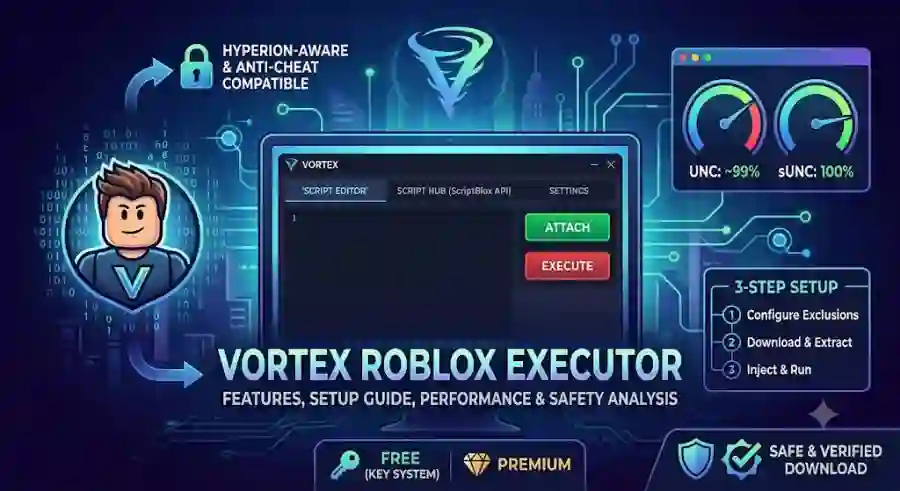
- Designed with compatibility for Roblox's evolving Hyperion anti-cheat architecture.
- Supports both client-side and server-side Lua script execution.
- Offers approximately 99% UNC compatibility and 100% sUNC compatibility based on developer-reported benchmarks.
- Includes direct integration with the ScriptBlox API, providing access to more than 60,000 community-created scripts.
- Features a customizable user interface with support for custom backgrounds and animated GIFs.
- Supports multiple Roblox instances simultaneously.
- Includes an integrated decompiler for inspecting compiled scripts before execution.
- Compatible with the standard Roblox client, Bloxstrap, and Fishstrap bootstrappers.
- Available through both a free key-based system and optional premium plans.
What Is Vortex Executor?
Vortex Executor is a third-party Roblox scripting tool created exclusively for Windows PCs. Its primary function is to serve as a bridge between custom Lua scripts and the Roblox game client, allowing users to execute scripts that automate gameplay, modify interface elements, or introduce additional client-side functionality.
Unlike basic script injectors that simply load Lua code into Roblox, Vortex focuses heavily on maintaining compatibility with modern Roblox security updates. The developers describe the executor as "Hyperion-aware," meaning its injection methods and memory-handling techniques are specifically designed around Roblox's current anti-cheat architecture.
This doesn't mean the software is undetectable, but rather that it is engineered to adapt to changes introduced by Roblox's security systems.
Another notable difference is the built-in integration with external script repositories. Instead of requiring users to search multiple forums, Discord servers, or paste websites for scripts, Vortex provides direct access to a large community-maintained script database inside the application itself.
This significantly simplifies the overall scripting experience, especially for beginners who may not know where to find updated scripts.
Key Features of Vortex Roblox Executor
One reason Vortex has attracted attention is the collection of features it combines into a single application. Rather than focusing only on script execution, it includes several tools designed to improve usability, compatibility, and workflow.
High UNC and sUNC Compatibility
Compatibility is one of the biggest factors when evaluating any Roblox executor.
Vortex reports approximately:
- 99% UNC Compatibility
- 100% sUNC Compatibility
UNC (Unified Naming Convention) and sUNC scores measure how effectively an executor supports complex Lua functions and scripting APIs without generating execution errors.
Higher compatibility generally means users experience fewer crashes and better support for advanced community scripts.
According to the reported benchmarks, Vortex can successfully execute many sophisticated Lua projects, including:
- Advanced admin command systems
- Auto-farming scripts
- GUI hubs
- Utility frameworks
- Automation suites
Because of this high compatibility, users can often run more demanding scripts with fewer stability problems compared to lower-performing executors.
Native ScriptBlox API Integration
Finding working Roblox scripts can often be frustrating.
Many scripts posted online become outdated quickly after Roblox updates, forcing users to spend time searching across multiple websites.
Vortex attempts to solve this issue through its built-in ScriptBlox API integration.
Rather than leaving the application, users can search an internal library containing over 60,000 community-submitted scripts directly from the executor.
The integrated script hub allows users to:
- Search by game title
- Browse available scripts
- Preview Lua code before execution
- Launch scripts with a single click
This built-in approach reduces the need to manually copy and paste code from external sources while making script discovery much more convenient.
Modern Customizable User Interface
Vortex also places significant emphasis on user experience.
Instead of using a minimal or outdated interface, the software features a modern gaming-inspired design that is intended to be both visually appealing and easy to navigate.
Users can personalize the interface by adding:
- Custom wallpapers
- Static background images
- Animated GIF backgrounds
Beyond appearance, the editor includes several productivity-focused tools, such as:
- Tab-based script editing
- Syntax highlighting
- Injection status indicators
- Organized navigation panels
These additions help both beginners and experienced script developers manage multiple scripts more efficiently.
Multi-Instance Support and Integrated Decompiler
Power users frequently run more than one Roblox game session at the same time.
To support this workflow, Vortex includes multi-instance functionality powered through RakNet networking protocols.
This allows separate scripting sessions to be attached independently to multiple Roblox windows running simultaneously.
For users who like to inspect existing scripts before executing them, Vortex also includes an integrated Decompiler.
The decompiler enables users to examine compiled script logic before running it, making it easier to understand script behavior and verify what a script is designed to do before execution.
While primarily useful for advanced users and developers, this feature can also help users review unfamiliar scripts before loading them into a game.
System Requirements and Platform Compatibility
Before downloading or installing Vortex, users should confirm that their computer meets the recommended hardware and software requirements.
Minimum System Requirements
| Component | Requirement |
|---|---|
| Operating System | Windows 10 or Windows 11 (64-bit) |
| Processor | 1.5 GHz Dual-Core CPU or Faster |
| Memory | Minimum 2 GB RAM |
| Recommended Memory | 4 GB RAM or More |
| Graphics | DirectX 10 Compatible GPU or Higher |
Supported Roblox Clients
Vortex is compatible with several commonly used Roblox launch methods, including:
- Standard Roblox Web Client
- Bloxstrap
- Fishstrap
This flexibility allows users to choose their preferred launcher while maintaining access to the executor's scripting capabilities.
Platform Compatibility
One important limitation is platform support.
Vortex has been developed exclusively for Windows PCs.
It does not provide native compatibility with:
- macOS
- iPhone (iOS)
- iPadOS
- Android smartphones or tablets
Users should also be cautious of websites advertising "Vortex Roblox Mobile" APK files or unofficial iOS packages. These versions are unverified third-party ports and should be approached with extreme caution, as their authenticity and safety cannot be confirmed.
Step-by-Step Setup and Installation
Installing a Roblox executor is usually more complicated than installing a normal application because these tools interact with running processes and memory. Security programs such as Windows Defender and third-party antivirus software often identify script execution tools as potentially unwanted programs because of their behavior.
These detections are commonly classified as false positives, sometimes appearing under labels such as PUP or Win32.HackTool.
Before starting the setup process, users should understand that proper configuration is important for avoiding installation interruptions and unnecessary errors.
Below is a general overview of the Vortex setup process.
Step 1: Configure Windows Defender and Antivirus Exclusions
Because Vortex works by interacting with the Roblox process, antivirus software may block certain files during installation or execution.
To reduce these interruptions, users typically create an exclusion folder inside Windows Security.
Follow these steps:
- Open Windows Security on your PC.
- Navigate to:
Virus & threat protection settings → Manage settings
- Scroll down to the Exclusions section.
- Select:
Add or remove exclusions
- Create a dedicated folder for Vortex, for example:
C:\VortexExecutor
- Add this folder to your Windows Defender exclusion list.
This allows the required files to remain accessible instead of being automatically quarantined by security software.
Step 2: Download and Extract Vortex Files
After configuring the required folder:
- Download the latest Vortex archive file, preferably in .zip format.
- Save the downloaded archive inside the previously created exclusion folder.
- Right-click the ZIP file.
- Select the extraction option.
- Extract all files into the same excluded directory.
Keeping all Vortex-related files in one dedicated location can help prevent missing-file errors and improve organization.
Step 3: Launch Roblox and Attach Vortex
Once the files are extracted:
- Open Roblox normally or launch it through a custom bootstrapper such as Bloxstrap or Fishstrap.
- Enter the Roblox game you want to access.
- Run:
Vortex.exe
with administrator privileges.
- Open the Vortex dashboard.
- Click the:
Attach / Inject
button.
After a successful connection, the console status should change to:
"Attached"
This indicates that the executor has connected with the Roblox client.
Step 4: Load and Execute Scripts
After Vortex successfully attaches:
Users can load scripts in two different ways:
Option 1: Using the Built-in Script Hub
The integrated ScriptBlox-powered library allows users to search for scripts by game name.
Users can:
- Search for specific Roblox experiences
- Browse available scripts
- Preview script information
- Load selected scripts
Option 2 Using Custom Lua Code
Advanced users can also paste their own Lua scripts directly into the built-in editor.
After adding the required code:
- Click the Execute button.
- The script will attempt to run through the Roblox client.
Understanding the Key System vs Premium Model
Vortex follows a hybrid monetization system that combines free access with optional paid subscription plans.
The model is designed to provide basic functionality to free users while offering faster access and additional benefits to premium members.
Vortex Access Plans
| Plan | Cost | Key Requirement | Features |
|---|---|---|---|
| Free Access | $0.00 | 24-hour Key Check | Full UNC/sUNC support and public ScriptBlox hub access |
| Weekly Pass | Approximately $0.60 (VND equivalent) | No Key Required | Continuous access, faster setup, and community support |
| Monthly Pass | Approximately $2.00 (VND equivalent) | No Key Required | Private script hub access and prioritized updates |
Free Version Key System
Free users need to complete a standard verification process before using Vortex.
This usually involves completing a Linkvertise or advertisement-supported checkpoint to generate a temporary access key.
Once the key is successfully verified:
- Full executor functionality becomes available.
- Access remains active for approximately 24 hours.
- Users must repeat the verification process after expiration.
Premium plans remove this requirement by providing continuous access without daily key generation.
Troubleshooting Common Vortex Issues
Like many advanced software tools, users may experience technical problems while running Vortex.
Most common issues can be resolved through basic troubleshooting steps.
Failure to Attach or Inject
Possible Cause:
- Roblox anti-cheat updates
- Background software conflicts
- Incorrect launch method
Possible Solution:
Try the following steps:
- Completely close Roblox.
- Restart the Roblox client.
- Launch Roblox using Bloxstrap instead of the standard web launcher.
- Run Vortex as Administrator.
- Attempt the attachment process again before joining a server.
Changes in Roblox updates can sometimes affect compatibility, so waiting for executor updates may also be necessary.
Scripts Not Executing or User Interface Freezing
Possible Cause:
Common reasons include:
- Outdated Lua syntax
- Broken script APIs
- Scripts designed for older Roblox versions
Possible Solution:
First, confirm that the script supports the current Roblox update.
Users can also test whether the scripting connection is functioning correctly by running a simple command inside the editor:
print("Hello World")
If the command works, the connection between the executor and Roblox client is active.
If not, the issue may be related to installation, compatibility, or attachment problems.
Missing DLL Errors
Possible Cause:
The system may not have required Visual C++ runtime libraries installed.
Possible Solution:
Download and install the latest:
Microsoft Visual C++ Redistributable Runtime libraries (x64)
from Microsoft's official download portal.
After installation:
- Restart the computer.
- Launch Roblox again.
- Retry opening Vortex.
Missing runtime files are a common reason why Windows applications fail to start properly.
Safety, Account Risks, and Best Practices
While Vortex provides many technical features, users should understand that third-party Roblox executors come with important risks.
Using any software that modifies how Roblox operates can affect account security, privacy, and long-term progress.
Roblox Terms of Service Compliance
Roblox's Terms of Service prohibit the use of third-party software designed to modify the Roblox client, inject unauthorized code, or change normal gameplay behavior.
Using an executor may violate these rules.
Players should understand that even if an executor claims improved compatibility or advanced anti-cheat awareness, it does not guarantee complete protection from detection.
Ban Waves and Detection Risks
Roblox regularly updates its security systems and performs automated detection checks.
These security actions can result in:
- Temporary account restrictions
- Permanent bans
- Loss of account progress
Even tools marketed as "Hyperion-aware" may eventually become detectable after Roblox introduces server-side security updates.
Anti-cheat systems continuously evolve, meaning no third-party executor can guarantee permanent safety.
Protecting Your Main Account
One of the most important recommendations for users experimenting with script executors is account protection.
Avoid using third-party executors on accounts that contain:
- Valuable Robux balances
- Rare inventory items
- Long-term gameplay progress
- Important achievements
Many experienced users recommend testing unfamiliar software only with separate accounts created specifically for experimentation.
Download Safety and File Verification
Another major concern involves fake versions of popular executors.
Cybercriminals often distribute modified software packages that appear legitimate but contain:
- Malware
- Credential stealers
- Harmful background programs
To reduce these risks:
- Download software only from official project channels.
- Avoid unknown websites offering modified versions.
- Be careful with unofficial APK files or mobile ports.
- Verify files before running them.
A legitimate-looking download does not always mean the software is safe.
Industry Impact and Why Vortex Matters
The growth of tools like Vortex reflects a larger trend within the Roblox ecosystem.
As Roblox becomes more advanced, scripting communities continue to develop new methods, tools, and platforms for customization.
Executors have become popular because they provide users with ways to experiment with Lua programming, automate repetitive tasks, and explore game mechanics from a technical perspective.
At the same time, Roblox continues strengthening its security infrastructure to protect developers, creators, and players from unfair advantages or unauthorized modifications.
This creates a constant technology race between platform security improvements and third-party software development.
For users interested in programming, tools like Vortex can also provide insight into concepts such as:
- Lua scripting
- APIs
- Game client architecture
- Software compatibility
- Debugging techniques
However, understanding the risks is just as important as understanding the features.