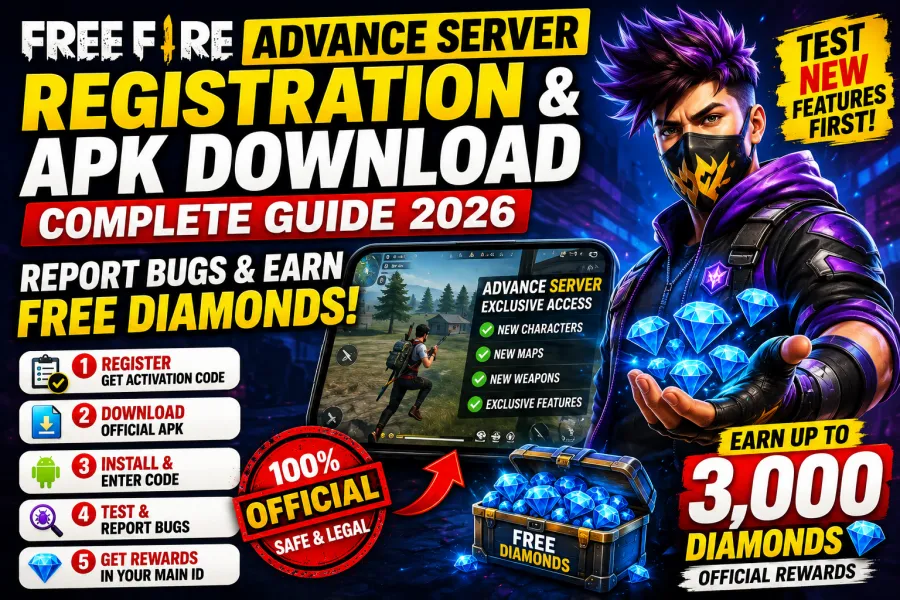
Garena Free Fire Advance Server Registration Guide, Get Early Access & Official Diamond Rewards
Every major Free Fire MAX update brings exciting new content—whether it's powerful characters, exclusive weapons, fresh maps, or gameplay improvements. But did you know you don't have to wait for the global release?
Garena gives selected players early access through the Free Fire Advance Server, an exclusive testing platform where upcoming features are made available before the official update launches.
Unlike unofficial APKs or hacked versions of the game, the Advance Server is 100% legal, officially managed by Garena, and designed to help developers identify bugs before releasing updates worldwide.
The best part? Players who discover and report genuine bugs can receive official diamond rewards credited directly to their main Free Fire account.
In this complete guide, you'll learn how to register for the Advance Server, download the APK safely, activate your account, submit bug reports, and improve your chances of earning free diamonds.
What Is the Garena Free Fire Advance Server?
The Free Fire Advance Server is a separate beta version of Garena Free Fire that allows selected players to test unreleased game content before it becomes available globally.
This testing environment helps Garena:
Identify bugs
Improve gameplay balance
Test new characters
Optimize weapons
Check server performance
Gather community feedback
Since it's a beta platform, players may occasionally encounter glitches—and that's exactly why Garena rewards bug hunters.
Why Should You Join the Advance Server?
Joining the Advance Server comes with several benefits that regular players don't get.
Early Access to New Features
Play upcoming content before anyone else, including:
New Characters
New Maps
New Pets
New Weapons
Gameplay Changes
Upcoming Events
UI Improvements
Official Diamond Rewards
Garena rewards players who submit high-quality bug reports.
Instead of risking your account with fake diamond generators, you can earn legitimate diamonds simply by helping improve the game.
Help Shape Future Updates
Your feedback directly contributes to improving future Free Fire updates for millions of players worldwide.
How to Register for the Free Fire Advance Server
Registration usually opens one to two weeks before a major update and remains available only for a limited time.
Because participation slots are limited, registering early significantly increases your chances of receiving access.
Step 1: Visit the Official Advance Server Website
Open your browser and visit Garena's official Advance Server portal.
Always use the official website and avoid third-party download pages, as unofficial APKs may contain malware or modified game files.
Step 2: Sign In Using Your Linked Account
Log in using the same account connected to your Free Fire profile.
Supported login methods typically include:
Google
Facebook
Using your primary game account ensures that any rewards you earn can be linked correctly.
Step 3: Complete Registration
Fill in the required information, including:
Email Address
Player Details
If registration is still open, Garena will generate your unique Activation Code.
This code is required to access the Advance Server after installation.
Save it carefully because you'll need it during your first login.
How to Download the Free Fire Advance Server APK Safely
Unlike the regular game, the Advance Server isn't available through Google Play or the Apple App Store.
Instead, you'll need to install the APK manually.
Download Only from the Official Website
Never download the APK from:
Unknown blogs
Telegram channels
File-sharing websites
YouTube descriptions
Unofficial APKs may contain harmful software or modified game files.
Download the APK
Once logged into the official portal, click Download APK.
The installation package usually ranges between 800 MB and 1 GB, so using a stable Wi-Fi connection is recommended.
Enable APK Installation
Before installing, allow APK installation from trusted sources.
On most Android devices:
Settings → Security → Install Unknown Apps
Grant permission only to the browser or file manager you're using.
Install the APK
Locate the downloaded APK file and begin installation.
The Advance Server installs as a completely separate application.
It does not replace or remove your existing Free Fire MAX installation.
Enter Your Activation Code
Launch the Advance Server.
When prompted, enter the Activation Code received during registration.
Without this code, you won't be able to access the testing servers.
How to Earn Free Diamonds by Reporting Bugs
One of the biggest reasons players join the Advance Server is the opportunity to earn official diamonds.
Garena regularly rewards testers who identify genuine issues affecting gameplay.
Diamond Reward Categories
Although rewards vary each testing cycle, serious bug reports may receive:
| Bug Type | Possible Reward |
|---|---|
| Major Game-Breaking Bugs | Up to 3,000 Diamonds |
| Gameplay Exploits | 1,000–2,000 Diamonds |
| Minor UI or Visual Bugs | Around 100 Diamonds |
Rewards are determined by Garena after reviewing submitted reports.
How to Submit a Proper Bug Report
Simply posting screenshots on social media won't count.
You must submit reports through Garena's official bug reporting system.
Record Evidence
If you discover a bug:
Record gameplay
Take screenshots
Capture the issue clearly
Visual evidence helps developers reproduce the problem.
Describe the Bug Clearly
Include information such as:
What happened
What should have happened
How often it occurs
Detailed explanations increase the chances of your report being accepted.
Include Device Information
Mention:
Device Model
Android Version
Game Version
This helps Garena identify hardware-specific issues.
Explain How to Reproduce It
Provide step-by-step instructions.
Example:
Enter Training Mode.
Equip a specific weapon.
Activate Character Skill.
Jump onto a wall.
Character falls through the map.
The easier developers can reproduce the bug, the faster they can verify it.
Submit Your Main UID
Always ensure your primary Free Fire UID is entered correctly.
If your report qualifies for a reward, Garena uses this UID to deliver diamonds to your main account.
How to Increase Your Chances of Receiving Rewards
Want to become one of Garena's top testers?
Follow these tips:
Register as soon as applications open.
Download only the official APK.
Test every new feature thoroughly.
Focus on gameplay-breaking bugs.
Submit detailed reports with screenshots or videos.
Avoid duplicate reports.
Check Garena announcements daily during testing periods.
Quality matters much more than quantity.
Is the Advance Server Safe?
Yes.
The Advance Server is officially developed and maintained by Garena.
It is completely safe when:
Downloaded from the official website.
Accessed using your own linked account.
Installed through the official APK.
Avoid modified APKs or unofficial "Advance Server" downloads claiming unlimited diamonds or unlocked features.
The Garena Free Fire Advance Server is one of the best opportunities for dedicated players to experience upcoming content before the official release while contributing to the game's development. From testing new characters and weapons to discovering bugs and earning legitimate diamond rewards, the program offers benefits that no unofficial tool or modified APK can match.
Remember, access is limited and registration windows are short, so keep an eye on Garena's official announcements before each major update. If you're selected, download the APK only from the official Advance Server website, use your activation code carefully, and submit detailed bug reports with screenshots or videos.
By helping Garena improve Free Fire, you not only get an early look at future updates but also have the chance to earn official diamonds safely and legally.
Frequently Asked Questions (FAQs)
What is the Free Fire Advance Server?
The Advance Server is Garena's official beta testing platform where selected players can test upcoming updates before their global release.
Is the Free Fire Advance Server free?
Yes. Registration and participation are free, but access is limited and requires an Activation Code.
Can I earn free diamonds from the Advance Server?
Yes. Garena rewards eligible players who submit verified bug reports with official diamond rewards.
Is the Advance Server APK available on Google Play?
No. The APK must be downloaded from Garena's official Advance Server website during the registration period.
Will installing the Advance Server delete my normal Free Fire MAX game?
No. The Advance Server installs as a separate application and does not replace your existing game.